
CLS Camilleri Lifting Services
Fleet Safety & OperationsCoordinator Role Assistant
Document Admin
CLS Cranes · Role Assistant

Fleet Safety & Operations Coordinator

Find the right action, system, form or site requirement quickly. Guided view explains the why; Quick view strips the workspace back for experienced users.

Search-firstDaily complianceControlled links
Daily compliance dashboard

Compliance at a glance

Import the daily Equipment Card List and Employee Card List exports. Select any status to drill down without leaving the dashboard.

🏗️
Asset ComplianceNo report loadedDrop Equipment Card List export
Waiting
current >90d missing expiry
👷
Personnel ComplianceNo report loadedDrop Employee Card List export
Waiting
current >90d missing expiry
🔒
Local processing: VisD spreadsheets are read inside your browser. This static Netlify site does not upload the report contents to a server. Parsed dashboard data is saved only to this browser's local storage until cleared.

Coordinator control centre

Start here. The assistant is designed around today's controls, fast actions and defensible evidence.

Today

Daily operating check. Ticks are stored on this browser for today's date only.

0 / 8

Coordinator scratchpad

Temporary notes for this browser.

Stored only in this browser's local storage. Do not use for passwords, medical details or sensitive employee information.

Use this assurance chain

RequirementWhat actually applies?
Control & ownerWho must do what?
EvidenceWhat proves it happened?
VerifyDid the control actually work?

Quick actions

Direct links to the systems and services the coordinator commonly needs.

How do I…?

Repeatable coordinator workflows. These are operating helpers, not substitutes for the current controlled client, regulator or manufacturer requirement.

Fleet compliance

Book a Certificate of Inspection (COI)

Use when a vehicle requires a TMR inspection booking.

Step-by-step +
  1. Confirm the asset/registration requiring inspection and the applicable due date.
  2. Open the TMR booking service and accept the online-service terms.
  3. Enter the vehicle registration and current CLS contact details requested by the service.
  4. Select the appropriate inspection location and a booking time that works operationally.
  5. Review the booking details and complete payment using the approved CLS payment process.
  6. Retain the receipt and booking confirmation.
  7. Record the booking in the current operational scheduling system so Operations/Workshop can see the asset commitment.
  8. After inspection, retain the inspection outcome/certificate and update the compliance source of truth.
UI changes: the previous coordinator handover used the Mackay Vehicle Inspection District and recorded the booking in Visual Dispatch as a CLS INTERNAL rental. Treat that as the previous working method and confirm any changed TMR/CLS workflow when the screen differs.
Fleet compliance

Registration payment & evidence

Pay registration, obtain a certificate and retain evidence against the asset.

Control sequence +
  1. Confirm the asset identity, registration expiry and any outstanding COI/inspection prerequisite.
  2. Pay before the due date through the approved Queensland registration service.
  3. Obtain the registration certificate/evidence where required for the crane/vehicle file or client pack.
  4. Update the fleet register/source system with the new expiry and attach the evidence.
  5. Check that operational systems do not continue showing the superseded expiry.
Queensland's registration page notes that where a registration renewal requires a Certificate of Inspection, an outstanding COI can prevent payment from being completed.
Heavy vehicle

Arrange / renew an NHVR permit

Build the permit around the actual vehicle configuration, route and movement.

Permit workflow +
  1. Identify the exact asset/configuration and intended movement.
  2. Confirm actual mass/dimensions, axle configuration and the route/access needed.
  3. Determine whether the movement is already covered by an applicable notice/access arrangement or requires a permit. Do not assume registration equals road access.
  4. Submit the required permit application in NHVR GO with accurate movement details and supporting information.
  5. Track road-manager consent / permit progress where relevant.
  6. When issued, review every condition, date, route, pilot/escort or travel restriction before treating the movement as ready.
  7. Save the permit to the asset/permit register and provide the applicable conditions to Operations/driver.
  8. Monitor expiry and close/renew before the next movement needs it.
Applicability first: permit requirements vary by vehicle, configuration, mass/dimension, route and access instrument. This helper does not determine permit applicability by itself.
Daily control

RapidWorks morning review

Turn new tasks into visible actions rather than letting defects disappear into the dashboard.

Review sequence +
  1. Review the Services and Tasks dashboard for new/overdue items.
  2. Separate routine service reminders from reported defects and safety-relevant tasks.
  3. For each defect, confirm asset, exact issue, operational status, owner and required follow-up.
  4. Escalate any safety-critical issue or unclear operating status rather than leaving it as a normal maintenance backlog item.
  5. Check due services against actual hours/km and the current maintenance basis.
  6. Track repair/service evidence to verified closure, not just a status change.
The previous coordinator handover specifically described checking RapidWorks Services and Tasks each morning. This role assistant keeps the practice but strengthens the defect/closure logic.
Crane compliance

Arrange CraneSafe / annual inspection

Plan the inspection, protect availability and close findings with evidence.

Workflow +
  1. Confirm the inspection due date and applicable inspection requirement for the crane.
  2. Check operational commitments so the inspection can be scheduled without creating an unsafe last-minute extension or unplanned downtime.
  3. Arrange the competent inspection provider using the current CLS-approved contact/process.
  4. Enter the booking/asset unavailability into the current scheduling system.
  5. Provide required crane documentation/history to the inspector.
  6. Record findings and prevent safety-related defects from being treated as administratively closed.
  7. Retain inspection evidence/certificate and update the next due date only after completion is verified.
The prior handover named a specific inspection contact. The current approved provider/contact should be verified before publishing a personal contact in this hub.
People compliance

Arrange Coal Board Medical / Health Assessment

Track the actual assessment and any earlier review trigger, not a generic expiry date.

Workflow +
  1. Confirm the worker/site/role requires a coal mine health assessment and identify the actual due/review trigger.
  2. Arrange the assessment/review through the current appointed medical adviser process.
  3. When the assessment is issued, check the Fitness for Duty section and any subsequent assessment/review date.
  4. Record the controlling date in the competency/medical register and retain evidence in the approved location.
  5. Where the client requires pre-mobilisation submission, send the required evidence within the client's lead time.
Stanmore's supplied gate requirements require a current Coal Board Medical and submission to its coal medicals mailbox 48 business hours before mobilisation.
Client access

Add / manage a BHP contractor profile

Use the BHP Contractor Website for profile creation and Intelics where the job/resource workflow requires it.

Coordinator sequence +
  1. Confirm the worker's legal identity/contact details and required BHP/BMA work scope/site.
  2. Create or update the contractor profile using the BHP Contractor Website as required.
  3. Capture the applicable SC identifier/profile information in the CLS competency/site-access record.
  4. Ensure required LMS/BMA Core/SOP training is assigned and completed for the intended site/role.
  5. Use Intelics where required by the contracting/job-card pathway to associate people/equipment resources.
  6. Verify site readiness before the worker is treated as allocatable.
Mobilisation

Stanmore accommodation

Open the Fly2Work portal used for Stanmore accommodation/travel bookings.

Before booking +
  • Confirm worker, site, dates and job requirement.
  • Confirm site access/induction timing is compatible with the travel/accommodation booking.
  • Use the current CLS approval/cost process before committing bookings.
  • Provide booking details to the worker and relevant Operations contact.
Special access / aviation

Mackay Airport height approval

Use for cranes or other temporary structures operating in the vicinity of Mackay Airport where height approval is required.
Airport permit workflow +
Lead time: the supplied Mackay Airport form requires submission at least 48 hours before operation. Where a proposal is above the Obstacle Limitation Surface (OLS) and breaches PANS-OPS, assessment may take up to 8 weeks. Do not leave this until mobilisation day.
  1. Confirm the job and crane. Identify the job address, exact crane, intended operating/setup heights, dates and times. A separate height approval is required for each crane.
  2. Pin the work location. Open Google Earth, search the job address, drop a pin at the crane location and capture the coordinates. The final application requires WGS-84 / WKID 4326 coordinates in DMS format.
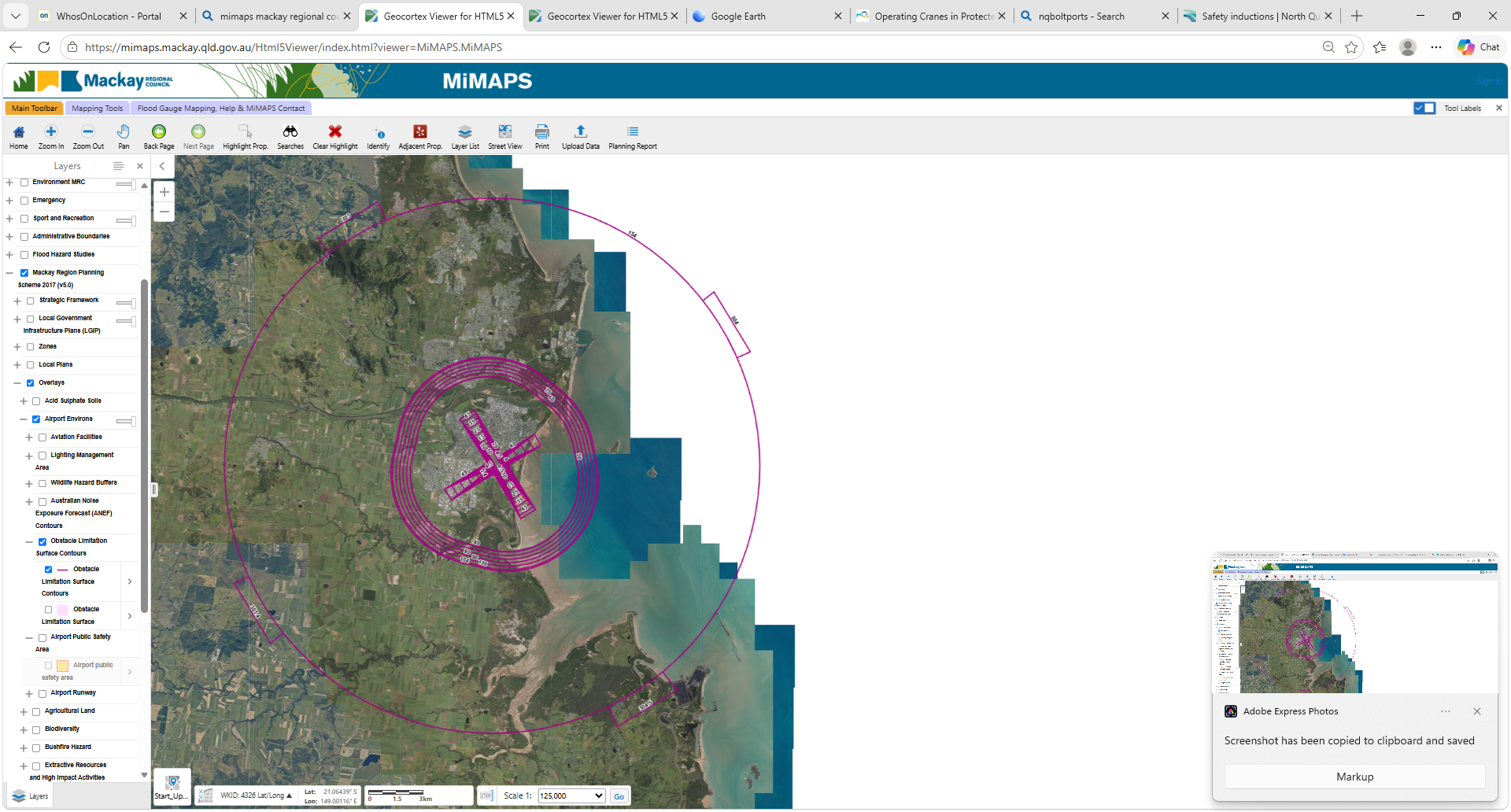
  3. Screen the location in MiMaps. Open Mackay MiMaps and use the airport obstacle limitation overlay shown below.
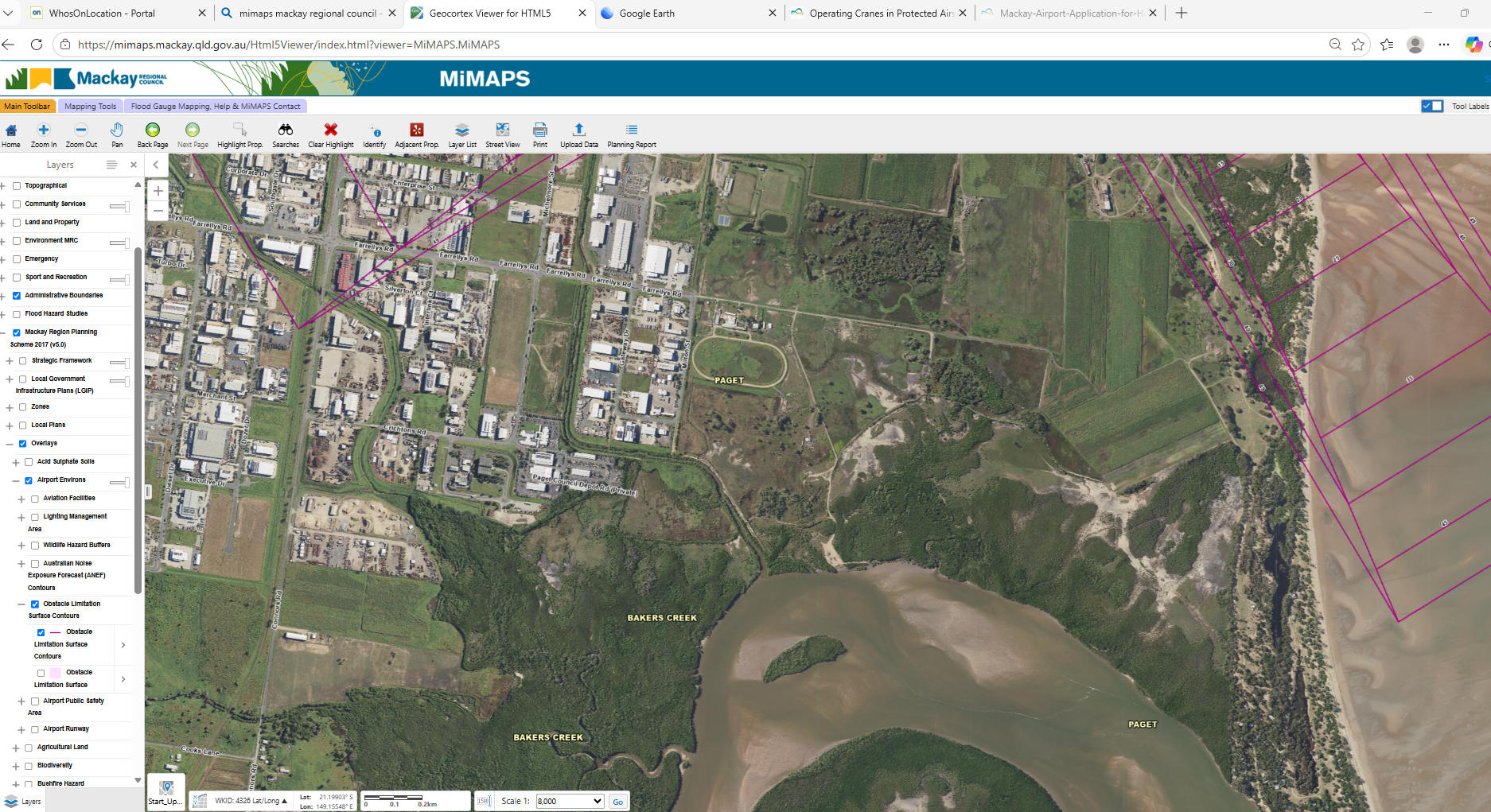
  4. Use the OLS contour as a screening/reference. Zoom to the exact crane location and identify the relevant obstacle limitation contour height. Do not treat the map itself as airport approval.
  5. Work out the proposal height. The form uses equipment height + ground level = maximum height of proposal AHD. Include attachments and the highest boom/setup position.
  6. Complete the application. Include builder/crane operator details, site description, coordinates, structure description, maximum AHD height, any staged heights, dates/times and the declaration. Attach a plan to scale / location plan where required.
  7. Submit both pages and supporting information. Send the completed application to the Mackay Airport Safety Officer. Retain the submitted form and approval in the applicable job / permit evidence location.
  8. Read the approval conditions before mobilisation. Approval may include operational conditions. The supplied form notes ASO notification before commencement and on completion, final ATC approval/weather dependency, and a steady red light at the highest point during hours of darkness.

MiMaps layer path

Mackay Region Planning Scheme 2017OverlaysAirport EnvironsObstacle LimitationObstacle Limitation Surface Contours
MiMaps Mackay Airport obstacle limitation surface overview
OverviewAirport obstacle limitation contours around Mackay Airport.
MiMaps detail showing obstacle limitation contours near Paget
Job-location detailZoom in to the proposed crane location and read the applicable contour.
Coordinate helper

Paste decimal coordinates from a map and convert to compact WGS-84 DMS for the application. Verify the location before submission.

Enter latitude and longitude.
AHD height helper

Simple arithmetic helper only. Use verified ground level and the maximum equipment height required by the application.

Maximum proposal height will appear here.
Airport Safety Officer: 0418 570 233 · aso@mackayairport.com. The supplied form is effective 30/04/2026 and shows review due 30/04/2028.
PERCOW: the previous coordinator handover identifies Mackay Airport PERCOW as a separate requirement where applicable. This workflow covers the supplied temporary-structure height approval form only. Add the current PERCOW trigger/form once confirmed rather than treating the two processes as interchangeable.
Client mobilisation

Prepare a crane pack

Build the pack from current evidence for the actual asset and client request.

Minimum control logic +
  1. Identify the exact asset and client/site request.
  2. Check the requested documents against the current asset compliance record.
  3. Use current certificates/registrations/inspection evidence and manufacturer/load-chart material relevant to that crane.
  4. Do not include superseded or expired evidence just because it is present in an old crane folder.
  5. Where client-specific documents are required, add only the applicable documents for that mobilisation.
  6. Record what was issued and retain the source evidence in the controlled asset file.

Systems & portals

No passwords are stored in this website. Use the approved CLS credential method and MFA where required.

Decision helpers

Simple prompts designed to catch missing controls. They do not replace competent technical, operational or statutory decisions.

Defect triage helper

Tick anything the reported defect may affect.

Record the defect and assess the operating status. Tick the relevant impact areas above.

A safety-critical or unclear defect should not be normalised into a maintenance backlog. Isolate/escalate as required and obtain competent verification before return to service.

Mobilisation readiness checker

Use before treating a worker + asset + site combination as ready.

0 of 8 controls checked. Not ready to treat as verified.

Role boundaries

A coordinator role assistant should make ownership clearer, not quietly make the coordinator responsible for every control.

Proposed operating boundary: these descriptions are a practical working model and should be checked against the current CLS position descriptions / management allocation before formal controlled release.

Fleet Safety & Operations Coordinator

Monitor, verify, coordinate, record, follow up and escalate compliance / readiness information within the assigned role scope.

Allocator

Schedule people and assets using current verified availability/readiness information and escalate clashes or gaps.

Operations

Own operational execution decisions, job planning interfaces and work sequencing within delegated authority.

Workshop / Maintainers

Perform maintenance/repairs and supply completion evidence; technical return-to-service decisions require appropriate competence.

Management

Approve/escalate matters requiring authority, resources, risk acceptance or management-system decisions.

Client & site guides

Search by client, site, portal or induction name. Amber cards still contain a defined confirmation gap.

Mackay Airport / Protected Airspace

Temporary structure / crane height approval workflow

2026 form suppliedAirport approval
Open site / approval guide +
  • Capture the exact crane location and coordinates.
  • Screen the location against the Mackay Airport OLS contour in MiMaps.
  • Calculate maximum proposal height in AHD using verified ground level and equipment height.
  • Complete a separate height application for each crane.
  • Submit at least 48 hours before operation; allow materially longer where aviation assessment is triggered.
  • Do not mobilise based on MiMaps screening alone. Retain the actual Mackay Airport approval and conditions.

Mackay Airport Application for Height Approval of Temporary Structure, effective 30/04/2026, review 30/04/2028. PERCOW remains a separate process where applicable and is not yet documented in this hub.

BHP / BMA

Contractor profile, BMA Core and site-specific training

Current working process BHP / LMS / Intellics
Open step-by-step guide +
Start here: use the BHP Contractor Website to add or manage the contractor profile. BMA site readiness then depends on the worker's applicable training and the specific site/job requirements.

Typical CLS workflow

  1. Check worker prerequisites. Confirm the worker holds the licences, competencies and medicals relevant to the job/site before starting the client onboarding process.
  2. Create / confirm the contractor profile. Use the BHP Contractor Website as required.
  3. BMA Core. BMA005 BMA Core Induction is part of the BMA onboarding pathway. Retain the completion evidence in the worker record.
  4. Site training. Applicable SOPs / other site courses vary by site and role. Complete the courses assigned for the relevant site.
  5. WAF. WAF is arranged with the client/site after required training is complete.
  6. LMS / Intellics. Use the worker's assigned LMS profile and Intellics process where applicable to the contracting arrangement. Direct internal URLs should only be added once the current CLS access path is confirmed.
  7. Close the loop. Verify completion and access before the person is treated as site-ready.
Do not assume: BMA Core alone does not make a worker ready for every BMA site. SOP/WAF and role/site requirements must still be checked.

Content baseline: current CLS working instructions plus the BHP contractor link supplied for this hub. LMS / Intellics direct links remain intentionally unlisted until the current CLS access path is confirmed.

Stanmore — South Walker Creek

SWC new starter / contractor access

Client documents supplied BISTrainer + SAC
Open step-by-step guide +
Stanmore gate rule: treat the site-specific onboarding lead time as the controlling minimum. A current Coal Board Medical must be sent to the Stanmore coal medicals mailbox 48 business hours before mobilisation. New starters/visitors must also be pre-registered with the Site Access Centre.

Evidence / prerequisites to have ready

  • Current Coal Board Medical / Health Assessment evidence as applicable.
  • Standard 11 SOA, or SOC within 6 months where accepted by the client process.
  • RII qualifications, licences and other role requirements for upload into BISTrainer.
  • Completed online modules assigned for the site.
  • Work area / site familiarisation completed before work commences.

SOC control: if the worker relies on a Standard 11 Statement of Completion, external validation must be completed within 6 months and the SOA provided before that period ends to retain site access.

SWC lead time and sequence

  1. Profile Creation Submission: send to the primary site's training department at least 7 days before mobilisation.
  2. BISTrainer: worker activates the profile from the BISTrainer email, completes required online learning and uploads RII qualifications / licences.
  3. Mandatory learning: STANMORE Core Modules 1–3; SWC Site Induction; SWC SOP 03, 05, 06, 13, 15, 16 and 18; Standard 11 units; then SWC Site Familiarisation onsite.
  4. Coal medical: send the current CBM/HA evidence to coalmedicals@stanmore.net.au at least 48 business hours before mobilisation.
  5. Pre-registration: complete the Visitor and New Starter Pre-Registration form and obtain the applicable site principal / superintendent / manager approval before forwarding it with the approval email to the SWC Site Access Centre.
  6. Gate check: ensure all required learning, access approval and familiarisation arrangements are complete before work starts.

Stanmore SMC-TRN-FRM-000005 v1.05 and SMC-HSS-FRM-000010 v5.04 supplied for the hub. The Profile Creation Submission form itself has not yet been supplied.

Stanmore — Poitrel Mine / CHPP

PTM and CHPP new starter / contractor access

Client documents supplied BISTrainer + SAC
Open step-by-step guide +
Stanmore gate rule: treat the site-specific onboarding lead time as the controlling minimum. A current Coal Board Medical must be sent to the Stanmore coal medicals mailbox 48 business hours before mobilisation. New starters/visitors must also be pre-registered with the Site Access Centre.

Evidence / prerequisites to have ready

  • Current Coal Board Medical / Health Assessment evidence as applicable.
  • Standard 11 SOA, or SOC within 6 months where accepted by the client process.
  • RII qualifications, licences and other role requirements for upload into BISTrainer.
  • Completed online modules assigned for the site.
  • Work area / site familiarisation completed before work commences.

SOC control: if the worker relies on a Standard 11 Statement of Completion, external validation must be completed within 6 months and the SOA provided before that period ends to retain site access.

Poitrel / CHPP lead time and sequence

  1. Profile Creation Submission: must be received no later than midday Friday before the following Wednesday onboarding day.
  2. BISTrainer: worker completes assigned online learning and uploads licences / RII evidence.
  3. Mandatory learning: STANMORE Core Modules 1–3; PTM Site Induction; PRM SOP 03, 05, 06, 13, 15, 16 and 18; Standard 11 units; PTM Site Familiarisation.
  4. CHPP additional: RMI Site Familiarisation is completed onsite by a PTM CHPP representative where CHPP access is required.
  5. Coal medical: send to coalmedicals@stanmore.net.au at least 48 business hours before mobilisation.
  6. Pre-registration: complete the Visitor and New Starter Pre-Registration form and obtain approval from the applicable site principal / superintendent / manager before submitting the form and approval email to the PTM Site Access Centre.
Visitor limit note: the supplied gate requirements state that people needing site entry for more than 7 consecutive days need to be fully inducted or classified under the site's specialist visitor arrangements.

Stanmore SMC-TRN-FRM-000005 v1.05 and SMC-HSS-FRM-000010 v5.04 supplied for the hub. The Profile Creation Submission form itself has not yet been supplied.

Argo Sites — CHPP Surface Induction

CLS worker onboarding, induction booking and CHPP access

Current instructions supplied to CLS Email + Contractor Portal
Open step-by-step onboarding guide +
Current CLS instruction: CHPP Surface inductions are conducted fortnightly on Tuesdays at the Regional Office. Submit the complete induction request package by the applicable cut-off — currently the Tuesday prior to the requested induction.

Before requesting the induction

  • Confirm the worker's required site, role, work scope and proposed induction date.
  • Confirm CLS / the contracting company is an approved Argo vendor and has an approved Contractor Management Plan for the work.
  • Complete all required worker details and the current Induction Request Form.
  • Have a current Coal Board Medical / health assessment and Standard 11 evidence relevant to the worker's role.
  • Include trade qualifications and current electrical licence where applicable.
  • Complete all required online learning before the worker attends the induction.
  • Provide evidence of the required coal-mining experience, or complete the applicable inexperienced-worker package where required.
  • Complete any required Contractor Management and site approvals.

Drug & Alcohol test

Timing control: the worker must have a valid Drug & Alcohol test completed within 5 days prior to the induction. Do not arrange it so early that it falls outside the five-day window on induction day.

Submit the booking

  1. Complete FMO-FRM-0054 Induction Request Form and assemble all supporting evidence.
  2. Email the complete request to CHPP.HST@argonr.com.au.
  3. Copy Kelly Peeters into the submission.
  4. Submit by the Tuesday prior to the requested induction unless Argo provides a different cut-off for that booking.
  5. Do not treat the worker as booked or cleared until the required approvals and booking confirmation have been received.

Exceptions

  • Outside the scheduled program: prior approval from both the HST Superintendent and SSE is required before arrangements are made.
  • Larger-than-standard groups: prior approval from both the HST Superintendent and SSE is also required. Allow adequate notice.
  • Incomplete prerequisites: a worker arriving without the required documentation, online learning, approvals or valid D&A testing may be refused entry and required to reschedule.

Argo contacts

Mechanical Coordinator — Luke Kingluke.king@argonr.com
Training Administrator, HST — Raylene Sellingsraylene.sellings@argonr.com
HST Coordinator — Kelly Peeterskelly.peeters@argonr.com
CHPP HST induction submissionsCHPP.HST@argonr.com.au
Document-control note: the hosted FMO-FRM-0054 copy is Ver 9.0 dated 26/02/2026. Its printed schedule records CHPP as Tuesday weekly, while the newer instructions supplied directly to CLS state fortnightly Tuesdays. This guide therefore uses the newer CLS-supplied scheduling instruction. Confirm any changed booking date or cut-off with Argo before mobilisation.

Source basis: current CHPP induction instructions supplied to CLS and FMO-FRM-0054 Ver 9.0. The form also records worker details, experience status, vendor / Contractor Management Plan checks, contract-owner approval and HST booking / attendance controls.

DBCT — Dalrymple Bay Coal Terminal

Site induction nomination, training and access pathway

Current process + rollout check Email + Mynesight / online
Open step-by-step guide +
Current Phase 1 process: the newer DBCT FAQ states new workers may complete the site induction either online or through face-to-face delivery by Mynesight. The FM0295 remains the nomination trigger in that FAQ.

General DBCT induction request

  1. Complete FM0295 electronically. The supplied form states handwritten forms are not accepted.
  2. Attach evidence. Supply relevant qualifications, certificates, licences and MSIC as applicable, plus a security photo in JPG format. The FM0295 minimum attachment section includes driver licence, photo, White Card and trade certificate / qualification where applicable.
  3. Submit at least 48 hours before site access. Email the completed form and attachments to induction@dbct.com.au. Allow two full business days minimum and ensure other requirements can be completed before the required access date.
  4. Select induction pathway. During Phase 1 DBCT may confirm online or face-to-face. For face-to-face, DBCT sends the FM0295 to Mynesight and Mynesight sends the booking link.
  5. Face-to-face details: Mynesight (RTO 31900), 10 Elvin Street, Paget; Tuesdays; 7:30 am–1:30 pm. Additional sessions may be scheduled based on demand.
  6. After site induction: role-based Site Ready / Job Ready / Task Ready learning may still apply. DBCT notes role requirements vary.
  7. Access confirmation: do not send the worker to site until the required access approval / proximity card advice has been received.

Face-to-face notes

  • Cost stated in the supplied FAQ: $90 per participant; White Card assessment available for an additional $75.
  • Bring photo identification and suitable PPE.
  • Successful participants receive RIIRIS201E Conduct Local Risk Control SOA and a DBCT Site Induction Certificate.
  • Groups of more than 8: contact People & Culture Inductions Team for a dedicated session.
  • Out-of-town / urgent workers may still use online learning during Phase 1 where face-to-face attendance is not possible.
Revision control: the FM0295 copy supplied is Rev 18 dated 23/02/2022. The newer process FAQ still refers to FM0295, but before this hub is treated as a controlled production source, confirm DBCT has not released a newer form revision or moved to Phase 2.

KAEFER RL4 project overlay

This is a project-specific requirement supplied for the upcoming RL4 project. Do not treat these extra steps as universal DBCT requirements unless the same contracting chain applies.

  • White Card issued after 11/05/2009; blue cards not accepted for this project instruction.
  • Clear shoulders-up headshot, no sunglasses or hat.
  • Working at Heights SOA.
  • Trade certificate or HRWL.
  • Driver licence.
  • Completed FM0295 sent as a Word document.
  • CC c.janke@kaefer.com.au and tess.heathwood@kaefer.com.au on the induction request for KAEFER compliance tracking.
Induction nominationsinduction@dbct.com.au
Process / training questionstrain.course@dbct.com.au

The DBCT online cheat sheet is retained for Phase 1 online learning support, but the newer DBCT process FAQ takes priority for the current induction delivery model.

Emeco

Contractor induction management

Current CLS working process Rapid Global
Open step-by-step guide +
  1. Open Rapid Global B2B.
  2. Select the Emeco client / contractor area available to the CLS account.
  3. Create or update the worker as required and issue the applicable induction.
  4. Check completion and any client-required evidence before treating the worker as site-ready.
  5. Record the completion / expiry in the current CLS worker competency system.

No credentials are stored in this site.

GrainCorp

Contractor induction managed through LinkSafe

Platform confirmed LinkSafe
Open step-by-step guide +
  1. Use the CLS GrainCorp LinkSafe contractor access / invitation.
  2. Confirm the correct GrainCorp site and induction package for the worker.
  3. Complete the client-required worker profile, induction and credential uploads.
  4. Verify completion before mobilisation and retain evidence in the CLS worker record.
Portal note: LinkSafe uses client-specific contractor portals. A direct GrainCorp portal URL has not been independently confirmed for this hub, so the button below opens LinkSafe's current site rather than guessing a client-specific login address.

Current CLS material identifies LinkSafe as the GrainCorp induction platform. Client-specific URL remains to be captured if available.

Hastings Deering — Commercial

Commercial location

Current CLS working process Rapid Global
Open step-by-step guide +
  1. Open Rapid Global B2B and select the Hastings Deering client area.
  2. Create / select the worker and issue the required induction key.
  3. Select TWO inductee roles: “Job – Other on Site” and “Task – Lifting and Craning – Contractor provided crane”.
  4. Confirm the applicable site / branch requirements and worker evidence.
  5. Verify induction completion before allocation.

Hastings Deering — Connors Road

Connors Road location

Current CLS working process Rapid Global
Open step-by-step guide +
  1. Open Rapid Global B2B and select the Hastings Deering client area.
  2. Create / select the worker and issue the required induction key.
  3. Select TWO inductee roles: “Job – Other on Site” and “Task – Lifting and Craning – Contractor provided crane”.
  4. Confirm the applicable site / branch requirements and worker evidence.
  5. Verify induction completion before allocation.

Hastings Deering — HD Park

HD Park location

Current CLS working process Rapid Global
Open step-by-step guide +
  1. Open Rapid Global B2B and select the Hastings Deering client area.
  2. Create / select the worker and issue the required induction key.
  3. Select TWO inductee roles: “Job – Other on Site” and “Task – Lifting and Craning – Contractor provided crane”.
  4. Confirm the applicable site / branch requirements and worker evidence.
  5. Verify induction completion before allocation.

Hitachi

Contractor induction management

Current CLS working process Rapid Global
Open step-by-step guide +
  1. Open Rapid Global B2B.
  2. Select the Hitachi client area.
  3. Create / update the worker and issue the applicable induction.
  4. Verify the worker's client-required licences / competencies and induction completion before mobilisation.

Komatsu — Queensland

Generic QLD induction required before branch-specific induction

Direct induction link Online Induction
Open step-by-step guide +
  1. Complete the generic Komatsu QLD induction.
  2. Then complete the specific induction for the branch the worker will attend.
  3. Arrange the required facility walk-around / familiarisation before the job starts.
  4. Keep evidence that both the generic and site-specific requirements are complete.

Komatsu — Commercial Avenue

Commercial Avenue site-specific induction

Direct induction link Online Induction
Open step-by-step guide +
  1. Ensure the worker has completed the Komatsu QLD induction.
  2. Complete the Commercial Avenue site-specific induction using the button below.
  3. Coordinate the facility walk-around / familiarisation before the job commences.
  4. Verify completion before mobilisation.

Komatsu — Connors Road

Connors Road site-specific induction

Direct induction link Online Induction
Open step-by-step guide +
  1. Ensure the worker has completed the Komatsu QLD induction.
  2. Complete the Connors Road site-specific induction using the button below.
  3. Coordinate the facility walk-around / familiarisation before the job commences.
  4. Verify completion before mobilisation.

Komatsu — Bosso Street

Bosso Street site-specific induction

Direct induction link Online Induction
Open step-by-step guide +
  1. Ensure the worker has completed the Komatsu QLD induction.
  2. Complete the Bosso Street site-specific induction using the button below.
  3. Coordinate the facility walk-around / familiarisation before the job commences.
  4. Verify completion before mobilisation.

Liebherr

Induction requested by email to contractor management

Email request process Email
Open step-by-step guide +
  1. Prepare the worker's name, induction expiry (if renewal), email address and phone number.
  2. Attach copies of the relevant HRWL, driver licence and White Card.
  3. Email the request to Liebherr contractor management.
  4. The completion link is then emailed / texted to the worker.
  5. Verify completion before mobilisation and retain evidence.

Mackay Regional Council

Contractor Work Health and Safety online induction

Client instructions supplied MRC Moodle
Open step-by-step guide +
Validity: the supplied MRC instructions state inductions are valid for 2 years.
  1. Open MRC Moodle and log in or create a new account using the worker's email address.
  2. Select the appropriate Contractor induction.
  3. Read the Contractor Induction Information and the assessment instructions.
  4. Read and accept the terms and conditions.
  5. Complete the 12-question Contractor Work Health and Safety assessment. The instructions require 100% to generate the certificate.
  6. Generate and retain the Certificate of Completion.
  7. The worker must be able to produce a photo or copy of the completion certificate before commencing work with Council.

Assistance: WHS at Council — 1300 622 529.

Mackay Sugar

Contractor induction / access

Rapid confirmed; site detail pending Rapid Global
Open step-by-step guide +
Current platform: Rapid Global is the working platform for Mackay Sugar in the current CLS register. The older aNewSpring transition process is intentionally not included as a live workflow.
  1. Open Rapid Global B2B and select the Mackay Sugar client area.
  2. Create / update the worker and complete the current Mackay Sugar contractor induction requirements shown in Rapid.
  3. Upload the required worker evidence and verify completion.
  4. Confirm any separate site induction / mill access requirement for the specific job before mobilisation.
Still to confirm: whether the historical Wednesday Racecourse Mill site induction / 6:50 am arrival process still applies, the current booking contact/process, and the current induction validity. Do not rely on the retired aNewSpring workflow.

Mackay Sugar Rapid Global is treated as current based on the revised CLS working register. Residual site induction details remain pending confirmation.

Mackay Port / NQBP

NQBP contractor induction and port card access

Current portal supplied NQBP MobiliseMe
Open step-by-step guide +
  1. Open the NQBP Access Portal as a returning user or create a new user account.
  2. Select the NQBP contractor induction option applicable to work at the Port / NQBP office.
  3. Operational letter: upload the required operational letter before the induction can commence. The CLS template link/file is still to be added to this hub.
  4. Complete the contractor induction requirements.
  5. Pay for / arrange the required Port Card or access pass.
  6. Verify access is active before mobilisation.
Missing file: add the current NQBP operational letter template to this hub once the controlled CLS copy is supplied.

RIW / Rail Industry Worker

Rail competency and network access helper

Network requirements must be checked RIW
Open step-by-step guide +
Important: an RIW card by itself does not prove a worker is ready for every rail network or role. Check the applicable network operator matrix and role requirements for the actual job.
  1. Identify the rail network/operator and the role the worker will perform.
  2. Open RIW and check the worker's current profile / competencies.
  3. Confirm the network-specific requirements, including SARC and medical requirements where applicable.
  4. Upload / manage medical or competency evidence through the current RIW process as required.
  5. Verify network/role readiness before allocation.
Still to confirm for CLS: the exact network profiles commonly required for Aurizon, Queensland Rail and Bowen Rail jobs, and the CLS standard minimum competency set for each.

Wilmar

Contractor induction management

Current CLS working process Rapid Global
Open step-by-step guide +
  1. Open Rapid Global B2B and select the Wilmar client area.
  2. Create / update the worker and issue the applicable induction.
  3. Complete any site / role requirements shown for the intended work location.
  4. Verify completion and record the evidence before mobilisation.

AMP Control

Contractor induction management

Rapid link supplied Rapid Global
Open step-by-step guide +
  1. Open Rapid Global B2B.
  2. Select the AMP Control client area available to CLS.
  3. Issue / complete the required induction and evidence uploads.
  4. Verify completion before site allocation.

Bowen Coking Coal / Burton

Burton induction entry

Process confirmation pending Rapid Global
Open step-by-step guide +

The current CLS register links this entry to Rapid Global, but the detailed site onboarding sequence, required roles, prerequisites and site-access approval steps have not yet been confirmed.

Before mobilisation: confirm the actual Burton / Bowen Coking Coal induction package and any client/site-specific prerequisites with the job contact.

Salmons

Contractor induction entry

Process confirmation pending Rapid Global
Open step-by-step guide +

Rapid Global is linked in the current CLS register, but the actual induction package, roles and booking / approval sequence still need to be captured.

Use with care: open Rapid to identify the current Salmons client requirements, then confirm the job-specific process before mobilisation.

Ahrens / MPFC

Ahrens MPFC induction

Process confirmation pending TBC
Open step-by-step guide +

The induction is identified in the current CLS register, but a current portal link and booking / issue process have not yet been confirmed.

Action: obtain the current Ahrens / MPFC induction request method, required documents, lead time and completion evidence before adding a live portal button.

Yurika / Broadsound / Lucidity

Yurika and Broadsound induction pathways

Process confirmation pending TBC
Open step-by-step guide +

The current CLS register identifies Yurika Broadsound and Yurika / Lucidity, but does not provide a verified current portal or workflow.

Action: confirm whether Lucidity remains the current platform, whether Broadsound has an additional site-specific induction, and the current request / approval path.

People, competency & medical quick reference

This is a helper, not a substitute for checking the actual client/site/role requirement.

HRWL

High Risk Work Licence

Check the class required for the actual plant/task. Record each relevant class separately where the CLS system requires it.

Licence expiry

Driver Licence

Road licence class

Check the class required for the vehicle being driven. HRWL does not replace the road licence requirement.

Licence expiry

White Card

General construction induction

Site/client acceptance rules can be stricter. DBCT RL4 project instruction supplied for this hub requires a White Card issued after 11/05/2009 and does not accept blue cards.

Client / evidence check

CBM / HA

Coal Board Medical / Health Assessment

Track the actual fitness-for-duty / review dates shown on the assessment. Stanmore requires a current CBM and submission 48 business hours before mobilisation.

Assessment-specific

Standard 11

Surface mine induction skill set

Site-specific acceptance and validation requirements still apply. Stanmore accepts an SOA or an SOC within 6 months under its supplied process.

Site / evidence check

Working at Heights

RIIWHS204E or accepted equivalent evidence

Do not assume one universal expiry. Check the client/site currency requirement for the job.

Site-defined

SARC

Safely Access Rail Corridor

Common rail prerequisite, but network and role requirements must still be checked in RIW.

Network-defined

Rail Medical

Category / rail medical as applicable

Medical category and currency depend on the rail safety role/network. Do not use a generic expiry rule without checking the applicable requirement.

Role / network-defined

First Aid / CPR

HLTAID011 / HLTAID009 where required

Track the actual certificate expiry / renewal requirement and client/site requirement.

Certificate / site-defined

Forms & controlled-source shortcuts

Included with this website package so the buttons continue to work when the complete folder is hosted on Netlify.

External document control: client forms remain the client's documents. Where a form states that printed/downloaded copies are uncontrolled, confirm the client has not issued a newer revision before relying on the hosted copy for a critical mobilisation.

Workshop Forms — Argo Sites

Site forms used when preparing or introducing CLS plant and equipment for applicable Argo / Fitzroy operations. Use the site-controlled process and confirm the current revision before a critical mobilisation.

Workshop / plant formRevision suppliedUseAction
Surface Plant & Trailers Mandatory Brake TestingCDCMC-FRM-0406-E Ver 3.0 — 14/08/2025 Surface brake testing record, including service / secondary brake efficiency, park brake, meter details, attachments and competent-person sign-off. Open Brake Test Form
Site Introduction — Surface VEMP Site AccessFMO-FRM-0777 Ver 6.1 — 28/03/2025 Surface Vehicle, Equipment, Machinery and Plant site-introduction / compliance inspection. Includes crane, vehicle, trailer, forklift, lifting-equipment and other applicable VEMP checks. Open VEMP Form
CLS crane preparation: the supplied VEMP form states cranes must display a current CraneSafe green sticker and report / associated certification as minimum site-access evidence, with maintenance records provided. It also asks whether a load monitoring device is fitted. Apply only the sections relevant to the equipment being introduced.

Client Induction Forms — Argo Sites

DocumentVersion / statusUseAction
Induction Request FormFMO-FRM-0054 Ver 9.0 — 26/02/2026 Worker induction / re-association request and internal approval pathway for Fitzroy / Argo sites. Open Induction Form

Other Client / Site Controlled Sources

DocumentVersion / statusPublished / source statusAction
Stanmore Visitor & New Starter Pre-RegistrationSMC-HSS-FRM-000010v5.0428/07/2025Open Form
Stanmore Induction & Gate RequirementsSMC-TRN-FRM-000005v1.0513/11/2024Open Requirements
DBCT FM0295 Site Induction Booking FormFM0295Rev 18.023/02/2022Open Form
DBCT Site Induction Process Change FAQDBCT P/L Site InductionPhase 1Supplied current working copyOpen FAQ
DBCT Online Learning Cheat SheetLearning PORTalLegacy / Phase 1 online supportSupplied copyOpen Cheat Sheet
Mackay Airport Height Approval of Temporary StructureTemporary structure / crane height applicationEffective 30/04/2026
Review 30/04/2028
Supplied current working copyOpen Form
Mackay Regional Council Induction InstructionsContractor WHS InductionInstructionsSupplied copyOpen Instructions

Content assurance & items still to close out

These are the remaining content gaps. They do not prevent the rest of the hub being used as a working helper.

Ahrens / MPFCCurrent portal/request process, prerequisites, lead time and evidence.
Bowen Coking Coal / BurtonDetailed Rapid roles / induction package and access approval sequence.
SalmonsDetailed Rapid workflow, roles and site prerequisites.
Yurika / Broadsound / LucidityCurrent platform and site-specific process.
Mackay Sugar site stepConfirm current separate site induction, booking details and validity. Rapid Global itself is treated as current.
DBCT rollout / FM0295 revisionConfirm Phase 1 vs Phase 2 and whether Rev18 remains the current form.
Stanmore Profile Creation formAdd the current Profile Creation Submission form to the forms library.
NQBP operational letterAdd the current controlled template used for Mackay Port onboarding.
Mackay Airport PERCOWAdd the current PERCOW trigger, form/link and submission pathway once confirmed. Keep separate from temporary-structure height approval.
Rail network profilesDocument the exact CLS network/role requirements commonly used for Aurizon, Queensland Rail and Bowen Rail.
Copied